Managed Postgres
DBaaS cloud offerings
When starting out with a new web project, chances are you’re going to need a database pretty soon. A common choice, still today, is to opt for a relational, SQL-based database, often times Postgres or MySQL. However, you might potentially not want to actually host your own database server (aka. RDBBS). Whereas setting one up is actually very straightforward using the official Docker images (postgres, mysql), all the maintenance work – including proper and secure configuration, robust operation, backups, etc. – would be up to you as well. That’s why almost every serious cloud provider has a managed “DBaaS” offering today, including AWS RDS, [GCP Cloud SQL], Scaleway Managed Postgres, Ionos PostgresSQL service, PlanetScale, Neon, MariaDB Cloud, and many more. These are dedicated, specialized cloud products.
Webhosting packages
And then there is Hetzner’s webhosting package.
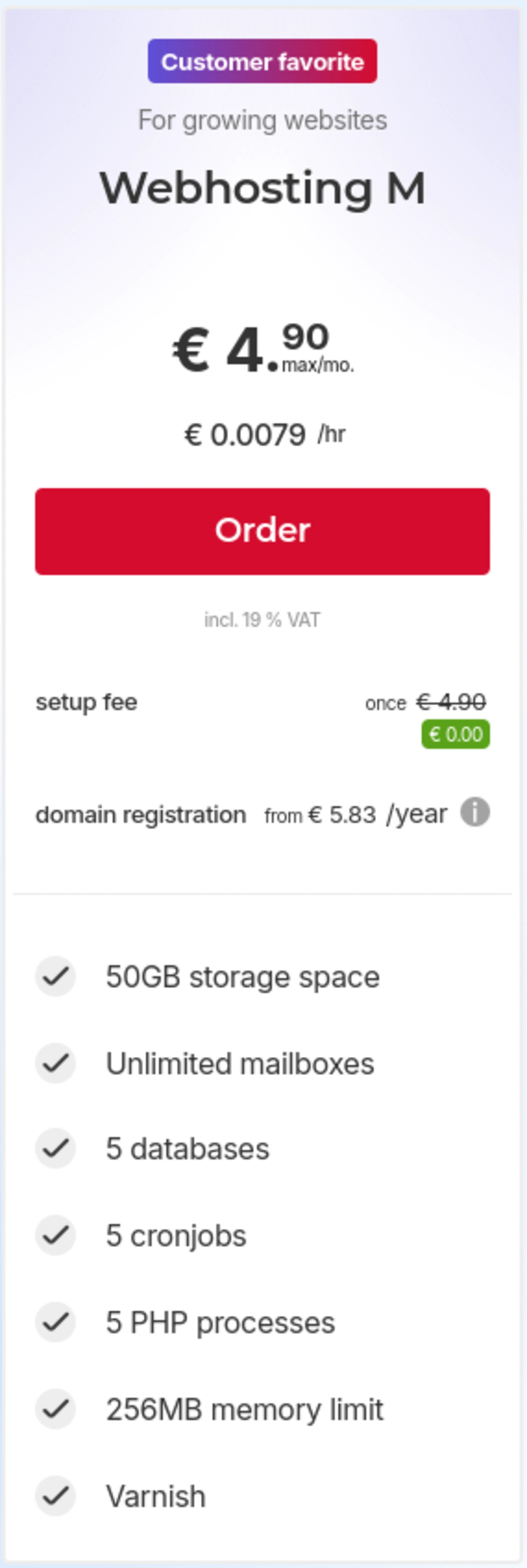
Offerings like these exist a lot, but they address a different market. It’s the market of webhosting providers (netcup, Strato, Manitu, One.com, … just to name a few), usually addressing people who just want to get a static website or some WordPress up and running – often times packaged together with a domain and some email hosting / inboxes included. It’s not a “cloud service” in that sense.
But, since WordPress, Joomla, Drupal, Typo3, etc. all require persistence, one or more MySQL and / or Postgres are usually included as well. They are not at the core of the product and are usually primarily purposed for low or moderate traffic and simple transactional-style (OLTP) queries. Technically, you can use it like a fully-fledged DBaaS, though.
At least as long as you’re fine with sharing the infrastructure with many other users (you’re not getting dedicated compute) and very limited configuration options. For most projects that’s probably sufficient though.
What makes these webhosting offerings so appealing is price: in case of Hetzner (others are roughly in the same range), you get five managed databases (again, on a shared instance though) for 4.90 € per month. Apart from that, you also get 50 GB of storage, unlimited email mailboxes (with IMAP, SMTP and CalDAV / CardDAV access) and sometimes also a domain (not with Hetzner though) as a “byproduct”.
So I asked myself: could you “abuse” this and actually use those databases in production for an arbitrary app? How well do they perform?
My expectation was that query performance would probably be quite poor and that they might even throttle or “rate-limit” the databases. I was to be proven wrong.
Benchmark
Loosely inspired by PostgresBench, I decided to run a simple benchmark – based on pgBench – against (a) a dedicated “Postgres as a service” and (b) a Postgres database included just as part of a webhosting package. For the former, I decided to go with Scaleway – which, to me, is somewhat like European version of AWS. Feature of these DBaaS offerings are quite comparable across cloud providers though, so take this less as “Hetzner vs. Scaleway”, but rather as “webhosting package vs. managed SQL”.
Setup
Option A: Scaleway managed PostgreSQL
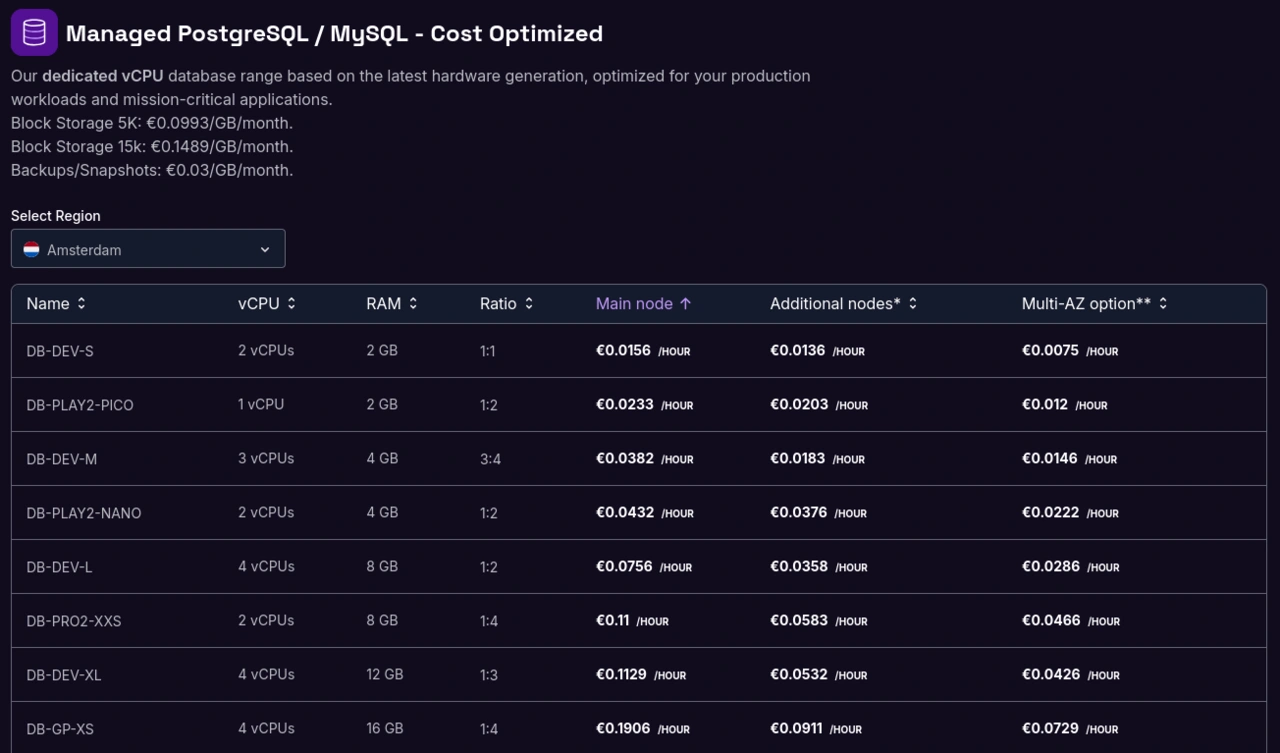
I went for the second-cheapest option, which is the DB-PLAY2-NANO instance type with 2 shared vCPUs, 4 GB RAM and the “15k block storage” option (vs. 5k, which is presumably faster storage, perhaps NVMe?), located in the Amsterdam (AMS) datacenter. Tests ran from a STANDARD3-X8C-32G compute instance (8 dedicated CPU cores, 32 GB RAM, 1.5 GBps network) in the AMS1 availability zone (same datacenter), interconnected with the database via a private network. I left the Postgres 17 database at its default settings, apart from setting max_parallel_workers=8 (which is the Postgres default).
Estimated price: 32.53 € / month
Option B: Hetzner webhosting
I opted for a Webhosting M package, including five Postgres 17 databases. Since you don’t get to configure or customize anything there, all configuration options were set to whatever Hetzner chooses as default. Test client was a CCX33 compute instance (8 dedicated CPU cores, 32 GB RAM) inside the same datacenter (without any additional private networking though).
Price: 4.90 € / month
Benchmark script
I tweaked the pgBench options used in the “official” PostgresBench (see above) a bit to make it smaller scale, especially went for -s 20 instead of -s 6349 (~300 MB database size instead of ~100 GB) and lowered the test duration to two minutes. The precise command I ran was:
1 | PGSSLMODE=verify-ca PGSSLROOTCERT=sqlca.pem pgbench \ |
Results
Raw benchmark output
For option A (Hetzner webhosting)
1 | pgbench (17.12 (Debian 17.12-0+deb13u1)) |
For option B (Scaleway managed Postgres)
1 | pgbench (17.12 (Debian 17.12-0+deb13u1)) |
Discussion
The most relevant number here is the tps in the last line, that is “transactions per second”: 12544 vs. 2392.
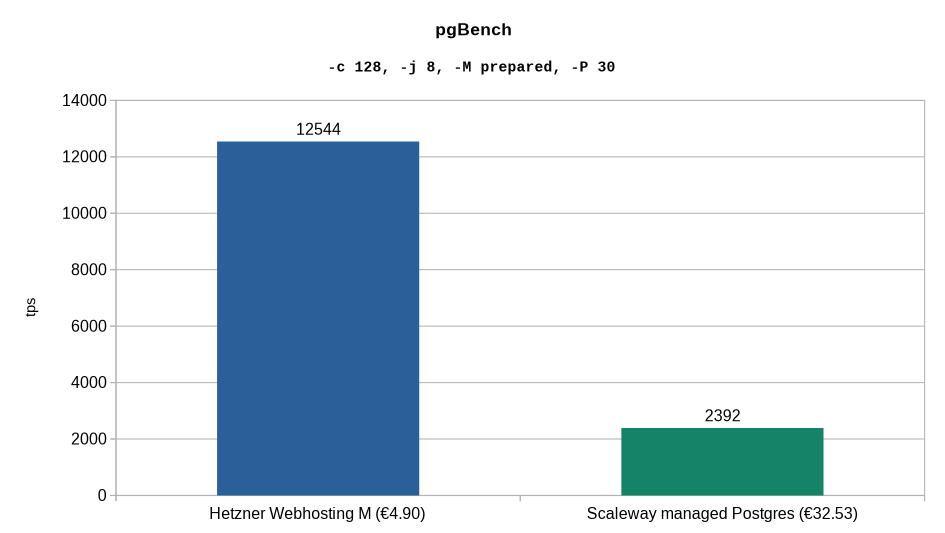
Wow! Naively put, you can probably read this like the shared webhosting DB being 5x as fast as the managed instance. I didn’t expect that.
Primary reason for the managed service being so much slower is probably increased latency: 53 vs. 10 ms on average, even though both test host and DB were located in the same datacenter in both cases. From my understanding, it’s hard to tell the difference in actual compute performance from these results, unfortunately.
Limitations
Of course, there are quite a few caveats to my “methodology” and the intepretation of the benchmark’s results here. This is explicitly far from a “scientifically” proper analysis.
While I ran the same benchmark tool (and version) with same parameters from comparably sized test hosts against the same target database version, the databases’ config parameters aren’t the same.
Also, the fact that latency is fives times as high in the second scenario compared to the first prevents from drawing meaningful conclusions about the actual compute performance. However, optimized latency is part of the service offering as well, so it’s probably fine to also have this reflect in the benchmarks as long as circumstances (same datacenter) are comparable.
Lastly, like with all benchmarks, the results’ significance with regard to actual real-world cases is, of course, very limited.
Nonetheless, by naive conclusion of this is: you can very well use a webhosting-included Postgres database in production for some “average” web application where you don’t care too much about tweaking specific database parameters, about potential performance drops at times (due to shared infrastructure) and lower SLAs.